Home Automation
product Integration
Awareness
of Smart Home increasing day by day. More than 10,00,000 + devices are
available that designed to make your home Smarter and life better. But all have
their own Mobile app, leaving client to use multiple home in a single home,
which is not practical nor user friendly. That’s why many solution providers
are developing Single App for multiple devices, let it be all from different
manufacturer. To use all different devices from a single app, you need to do
integration via API or SDK.
Home
automation integration connects devices in your home so that you can
control and manage them from a single platform. This can make your home
more convenient, efficient, and secure.
In
modern software development, the SDK and API are two principal tools you’ll
encounter. They share plenty in common, and sometimes there’s confusion around
what they each do.
At
their core, both the SDK and the API enable you to enhance the functionality of
your application with relative ease. To deliver on the promise of either or
both—and improve the experience both in-house and for end-users—it’s important
to understand how both tools work on the backend, how they differ and how they
contribute to the overall development process.
What
is an SDK?
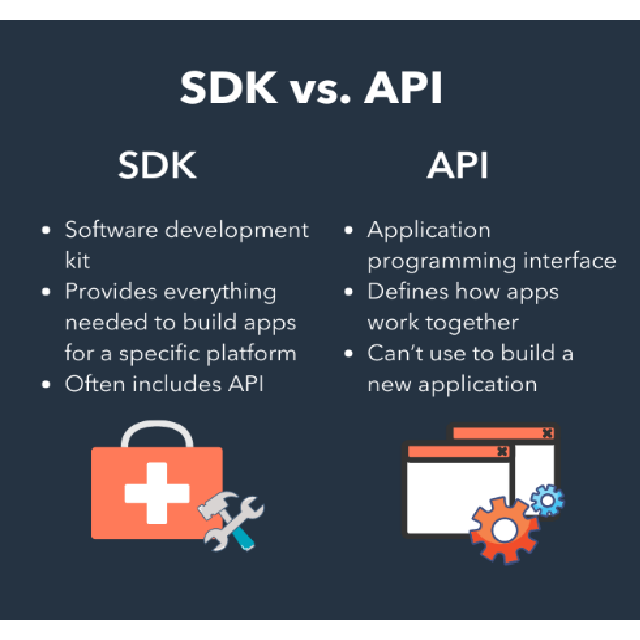
SDK stands for software development kit. Also known
as a devkit, the SDK is a set of software-building tools for a specific
platform, including the building blocks, debuggers and, often, a framework or
group of code libraries such as a set of routines specific to an operating
system (OS).
A
typical SDK might include some or all of these resources in its set of tools:
·
Compiler: Translates from one
programming language to the one in which you will work.
·
Code
samples: Give
a concrete example of an application or web page.
·
Code
libraries (framework): Provide
a shortcut with code sequences that programmers will use repeatedly.
·
Testing
and analytics tools: Provide
insight into how the application or product performs in testing and production
environments.
·
Documentation: Gives developers
instructions that they can refer to as they go.
·
Debuggers: Help teams spot errors in
their code so they can push out code that works as expected.
Often,
at least one API is also included in the SDK because without the API,
applications can’t relay information and work together.
How
an SDK works
SDKs provide a comprehensive collection of tools
that enable software developers to build software applications faster and in a
more standardized way.
Cloud native mobile
app development, for example, leverages Apple’s iOS SDKs or Google’s Android
SDKs for that platform. For larger-scale applications, such as enterprise
Software-as-a-Service (SaaS) and proprietary web and desktop software
applications, Microsoft provides the commonly used, open-source .NET SDK.
The
simplicity of an SDK is just as valuable as the tools in the kit. Here’s how it
works:
1.
Purchase,
download and install the “kit” for your platform (for example, premade parts,
examples and instructions).
2.
Open
and leverage any APIs and all the development tools you need to build a new
application, beginning with the integrated development environment (IDE). This
is the space where you will do the actual coding and where your compiler is.
3.
Use
the instructions, documentation, code samples and testing tools to do the
building, which gives you and your team a healthy head-start.
SDK
use cases
SDKs are part and parcel of mobile app development.
They have many use cases:
·
Programming
language-specific SDKs like the JSON and Java
Developer Kit (JDK) are used to develop programs in those languages in
a streamlined, standardized way.
·
Analytics
SDKs from Google and others provide data about user behaviors, paths and
actions.
·
Monetization
SDKs like Google, Facebook and others make it easy for developers to roll
advertising out in their existing apps, with the goal of generating revenue.
SDK
benefits
SDKS
make developers’ jobs easier by providing these benefits:
·
Access
to constituent parts and instructions for software development: A retail SDK, for example,
that pulls in all the things you’d want in your app (for example, favorites,
cart, save for later, checkout, etc.).
·
Faster
and smoother integrations: SDKs
simplify the standard processes needed and provide ready access to information
needed.
·
Shorter
development cycle, getting products deployed and into market more efficiently: Because an SDK is built
to inform, equip and provide shortcuts to development, developers can focus on
developing the product they’ve planned.
·
Built-in
support and expertise: No
need to search for answers or hire out to augment your team; SDKs come
pre-loaded with expertise in the code already written and the support
documentation included.
·
Cost
control: All
the listed benefits enable you to better adhere to an established budget during
development and post-deployment.
Now
let’s dive into how that intermediary—the API—works.
What
is an API?
API stands for application programming interface. Whether
working as a stand-alone solution or included within an SDK, an API facilitates
communication between two platforms. It does this by allowing its proprietary
software to be leveraged by third-party developers. The developers can then
enable their own users to indirectly use the service or services provided by
the API
solution.
You
can also think of an API as a kind of agreement between two parties. The API
not only allows for on-demand information exchange. It stipulates how that
information should be exchanged.
Because
some APIs provide the interface directly, the terms “API” and “interface” are
sometimes used interchangeably.
To
break that down, an API can consist of two things:
·
Technical
specifications and documentation: This
information explains how you’ll need to integrate the API to use it
effectively.
·
The
interface itself: You
can access it directly via keyword (in the case of a web API) or indirectly
from a separate interface (in the case of a REST API).
A
few of the popular APIs are:
·
Web
APIs, which are
used to reach web browsers and devices or as their own web services
application.
·
SOAP
APIs, which are
a popular choice in cases of heightened data privacy and security.
·
Open
APIs (or
public APIs) and REST (or RESTful) APIs, which are a popular choice for ease of
use and maximizing bandwidth.
·
JSON-RPC, a goto for cases where
asynchronous server calls are needed.
·
Custom
APIs, for
maximum agility with all the moving parts of software development.
How
an API works
APIs make smooth, efficient integrations between
applications possible.
For
example, let’s say you have a real estate application. Your users want to be
able to search for available real estate inventory—a service your software
already provides. Furthermore, your users want to search for inventory within a
certain area—a certain school district, perhaps.
The
most logical solution is to integrate with an established service. Leveraging a
geolocation API would enable your application’s end users to use that service
to focus on particular inventory without any awareness that the geolocation
application is separate.
From
a technical standpoint, here’s what an API call entails:
1.
As
the application user who needs to complete a task, you initiate the task from
your app, creating a request.
2.
The
API makes a call to the web server, relaying the request. The API knows where
to send the request because it goes to the API endpoint, typically the URL of a
server.
3.
The
task is then executed by the third-party application, or database, providing
the service.
API
use cases
APIs make many of the digital tools we routinely
use possible. Here are three of the many API use cases:
·
Map
APIs are
commonly used to customize a map on a web page or mobile application.
·
Payment
APIs are
often used by e-commerce companies so they can offer purchasing flexibility to
customers, expanding their potential customer base as a result.
·
Weather
APIs can
enhance the user experience of sports apps, search engines, etc.
API
benefits
APIs
enhance both the development experience and the end-user experience doing the
following:
·
Connecting
disparate software applications for a stronger overall product offering.
·
Shortening
the development cycle through automation.
·
Reducing
resources that would otherwise need to be allocated for in-house work.
·
Improving
brand recognition and trust.
·
Providing
new services to end-users with maximum efficiency.
Do
you have to choose between SDK and API?
No—in fact, as noted above, an
SDK often contains at least one API. These two help you in different ways but
can and do work together.
APIs,
again, serve to define how different platforms work together. They facilitate
interaction through specifications (protocols); and as facilitators, they serve
as one of the tools in a complete kit.
SDKs
are the complete kit. They go beyond facilitation (though they include it) to
provide everything for building new software for a specific platform or
programming language.
For
a further breakdown on the relationship between SDKs and APIs, check out this
video:
API
vs. SDK: What is the Difference?
Challenges
and how to address them
The overwhelming sentiment when
it comes to leveraging SDKs and APIs is that they make developing software
applications easier and more cost-effective. They’re about as common to
developers as email and chat platforms are to any business team.
That
being said, there are some notable challenges that come with using APIs and
SDKs. One challenge involves security breaches. Patchwork software development
can result in unintended loopholes that can potentially expose personal
information of users. There have even been cases of rogue SDK developers
shopping around (and sometimes successfully propagating) SDKs capable of
fraudulent activity, unbeknownst to the programmers using them.
For
this reason, it is key for teams of all sizes to vet their providers and keep
security on their radar throughout the development cycle.
Another
challenge specific to SDKs has been the frequency of updates. When a
development house has to support multiple versions of an SDK, it can cause
synchronicity issues between that SDK and any APIs and backend systems is uses.
In order to avoid end-user issues and security breaches, DevOps teams
need to keep a close eye on versioning.
Availability
is top-of-mind for most development houses—but having control over those
development tools is equally critical.